Index (Glossary) über Inhalte per Drupal Views2 erstellen

Heute bin ich mal wieder ein Stück tiefer in das Views-Modul eingestiegen... selbst wenn mir noch ein paar Gimmicks fehlen, bin ich dabei auf eine interessante Funktion gestoßen.

Manchmal macht es Sinn, Inhalte gruppiert z.B. nach dem Anfangsbuchstaben des Titels auszugeben und direkt per Liste dieser Buchstabend auf die Übersichten zu verweisen.

(z.B. [ A | B | C ... | X | Y | Z ]

Zunächst einmal musste ich feststellen, dass es zu diesem Zweck auch spezielle Module gibt. Diese haben bei mir aber eher für Ärger als für Erfolge gesorgt und davon abgesehen ist es sicher immer besser, gute bestehende Module zu nutzen als weitere zu installieren.

Hier nun also die "Kurzanleitung":

  1. View erstellen
  2. Filter und Sortierung auf die gewünschten Inhalte erstellen
  3. "Argument" hinzufügen (z.B. "Titel") und "Glossary Mode" wählen
  4. "Zusammenfassung, aufsteigend sortiert" in den Argument-Optionen wählen
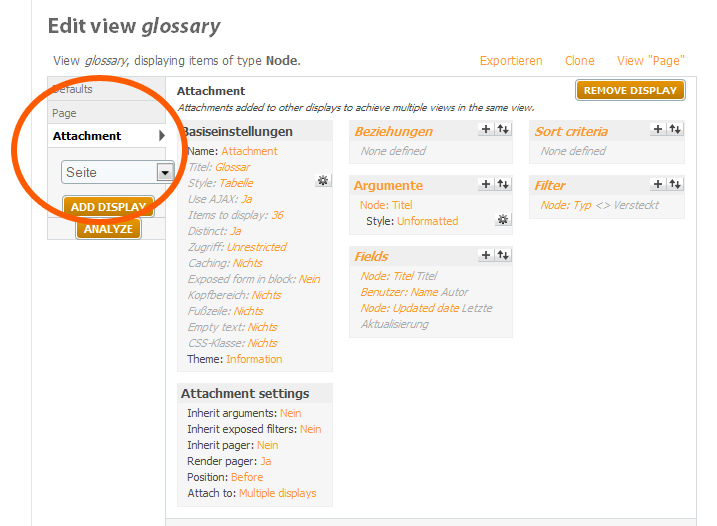
  5. View-Elementkategorie "Anhang" hinzufügen mit den Optionen: "Keine Vererbten Argumente", "Keine Vererbten, veröffentlichten Filter", "Position: Vorher", "Anhängen an: 'Defaults'"

... und schon läufts!

AttachmentSize
Drupal Glossar Anhang Screenshot - zu Kommentar131.34 KB
Einordnung:

Comments

Gast's picture

Werde ich mal ausprobieren

Hallo,

ich habe eine Seite da ist ein Branchenverzeichnis drin, da kann ich das gut mal ausprobieren und hoffe das es dort auch klappt.

Viele Grüße

Marita Betz

Gast's picture

Was ist mit View-Elementkategorie gemeint?

Hallo,

ich habe gerade versucht das Glossar in meinen View einzufügen. Nur ist mir nicht ganz klar was mit dem Begriff "View-Elementkategorie "Anhang" gemeint ist.

Es wäre nett, wenn Sie dazu kurz noch was erklären könnten. Danke.

Viele Grüße

Marita Betz

webksde's picture

Hallo Marita, ich habe dir

Hallo Marita,

ich habe dir einen entsprechenden Screenshot angehängt.
Hoffe das hilft dir.

Post new comment

The content of this field is kept private and will not be shown publicly. If you have a Gravatar account associated with the e-mail address you provide, it will be used to display your avatar.
  • Web page addresses and e-mail addresses turn into links automatically.
  • Internal paths in single or double quotes, written as "internal:node/99", for example, are replaced with the appropriate absolute URL or path. Paths to files in single or double quotes, written as "files:somefile.ext", for example, are replaced with the appropriate URL that can be used to download the file.
  • Allowed HTML tags: <a> <em> <strong> <cite> <code> <ul> <ol> <li> <dl> <dt> <dd><blockquote>
  • Lines and paragraphs break automatically.
  • Pairs of<blockquote> tags will be styled as a block that indicates a quotation.
  • You can enable syntax highlighting of source code with the following tags: <c>, <cpp>, <css>, <drupal5>, <drupal6>, <java>, <javascript>, <mysql>, <php>, <python>, <ruby>, <smarty>, <xml>. The supported tag styles are: <foo>, [foo]. PHP source code can also be enclosed in <?php ... ?> or <% ... %>.
  • Textual smileys will be replaced with graphical ones.
  • Each email address will be obfuscated in a human readable fashion or (if JavaScript is enabled) replaced with a spamproof clickable link.

More information about formatting options

Type the characters you see in this picture. (verify using audio)
Type the characters you see in the picture above; if you can't read them, submit the form and a new image will be generated. Not case sensitive.